hardware guide
Best Microphones for Streaming in 2026
Looking for the best microphones for streaming? We break down the top USB and XLR options for 2026 to help you upgrade your Twitch or YouTube audio clarity.
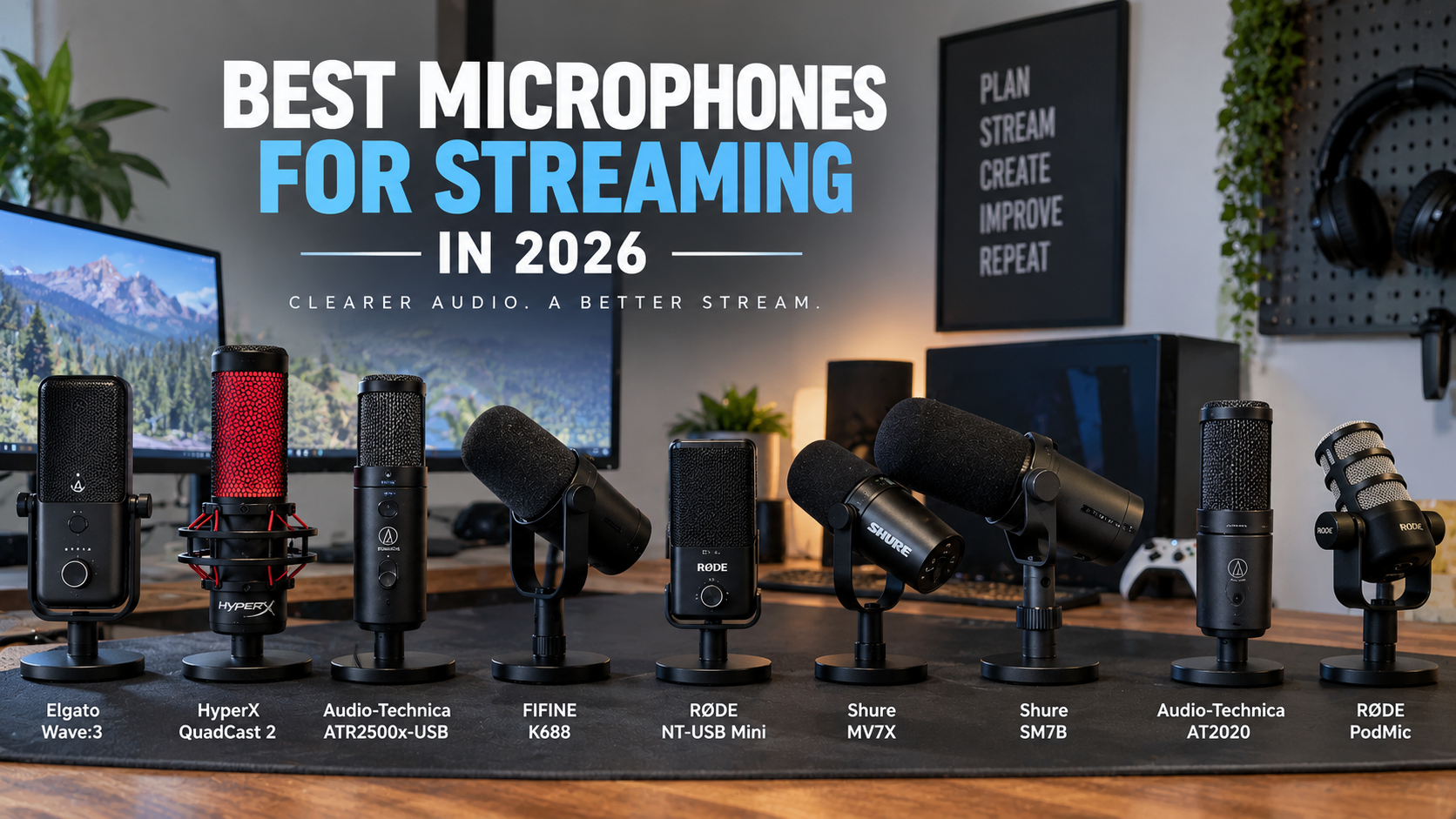
Audio quality often dictates whether viewers stay on a stream or click away. Poor audio characterized by harsh room echo, background hum, or constant clipping can alienate an audience faster than low video resolution. Finding the best microphones for streaming requires balancing your physical environment, your hardware comfort level, and your budget.
Whether you are launching a new channel on Twitch or upgrading an existing YouTube production, this guide explores top hardware options, explains the technical differences between USB and XLR formats, and outlines practical strategies for achieving crisp, broadcast-ready sound without overspending.
Key Takeaways
- Microphone choice depends heavily on your room acoustics; untreated spaces benefit greatly from dynamic capsules or proper gain staging.
- USB microphones offer plug-and-play simplicity, while XLR setups require an audio interface or mixer but provide long-term upgrade paths.
- Software tools like OBS filters and dedicated mixing utilities can drastically improve vocal clarity without requiring expensive hardware upgrades.
- Proper boom arm placement and proximity to your mouth matter more than purchasing the most expensive microphone on the market.
- Beginners do not need high-end studio microphones to sound professional; entry-to-mid-tier options offer exceptional performance out of the box.
Quick Picks
- Elgato Wave:3 — Streamers who manage multiple audio feeds inside software
- HyperX QuadCast 2 — Gamers and creators needing quick tactile mute access
- Audio-Technica ATR2500x-USB — Streamers wanting straightforward, reliable USB voice reproduction
- FIFINE K688 — Creators working in untreated rooms who want future upgrade paths
- Rode NT-USB Mini — Streamers with limited desk space or minimalist aesthetics
Streaming Microphones Comparison Matrix
| Microphone | Connection Type | Capsule Type | Interface Required | Best Use Case |
|---|---|---|---|---|
| Elgato Wave:3 | USB-C | Condenser | No | Streamers wanting built-in software audio mixing |
| HyperX QuadCast 2 | USB-C | Condenser | No | Gamers needing intuitive touch-to-mute controls |
| Audio-Technica ATR2500x-USB | USB-C | Condenser | No | Budget-conscious creators wanting crisp USB vocal capture |
| FIFINE K688 | USB / XLR | Dynamic | Optional (for XLR) | Noisy rooms seeking upgrade flexibility |
| Rode NT-USB Mini | USB-C | Condenser | No | Minimalist desk setups with limited space |
Elgato Wave:3
Relevant option
Provides built-in digital audio routing through Wave Link to manage game, voice, and stream audio channels easily.
Who it is best for
Streamers who manage multiple audio feeds inside software
Important features
- Proprietary Clipguard technology to prevent distortion
- Wave Link digital mixing software integration
- Capacitive mute button with LED status ring
- Direct USB-C plug-and-play operation
Pros
- Excellent software routing capabilities for dual-PC or complex single-PC setups
- Physical dial controls input gain and headphone volume seamlessly
- Clipguard automatically lowers volume peaks to protect stream audio
Cons
- Condenser capsule picks up room noise more readily than dynamic alternatives
- Advanced software features require running the Wave Link application
Elgato Wave:3
View current specifications, availability, and pricing from the retailer.
Best for
Relevant option
Price and availability on Amazon
Check Price on AmazonHyperX QuadCast 2
Relevant option
Offers intuitive physical controls and accessible muting features for live broadcast environments.
Who it is best for
Gamers and creators needing quick tactile mute access
Important features
- Tap-to-mute sensor with clear LED indicator
- Built-in anti-vibration shock mount
- Multiple selectable polar patterns
- Convenient onboard gain adjustment dial
Pros
- Included shock mount effectively dampens desk thumps and bumps
- Easy-to-access tap-to-mute prevents accidental hot mic moments
- Versatile polar patterns adapt to interviews or solo commentary
Cons
- Bulky physical footprint takes up noticeable camera space
- Higher price point compared to basic entry-level USB units
HyperX QuadCast 2
View current specifications, availability, and pricing from the retailer.
Best for
Relevant option
Price and availability on Amazon
Check Price on AmazonAudio-Technica ATR2500x-USB
Relevant option
Delivers crisp audio capture via modern USB-C connectivity with minimal initial configuration.
Who it is best for
Streamers wanting straightforward, reliable USB voice reproduction
Important features
- Cardioid polar pattern reduces side and rear pickup
- Headphone jack with volume control for direct monitoring
- USB-C output compatible with modern computers
- Sturdy metal construction
Pros
- Clear, natural vocal frequency response out of the box
- Solid build quality ensures long-term durability
- Simple direct monitoring prevents audio delay
Cons
- Lacks onboard physical mute button
- Included desk stand is basic and benefits from a boom arm upgrade
Audio-Technica ATR2500x-USB
View current specifications, availability, and pricing from the retailer.
Best for
Relevant option
Price and availability on Amazon
Check Price on AmazonFIFINE K688
Relevant option
Combines USB convenience with an XLR output to allow upgrading to a dedicated audio interface down the road.
Who it is best for
Creators working in untreated rooms who want future upgrade paths
Important features
- Dual USB and XLR connection ports
- Dynamic capsule design for background noise rejection
- Mute button and headphone monitoring jack
- Internal shock isolation features
Pros
- Dynamic capsule handles noisy rooms better than standard USB condensers
- Dual connectivity lets you start with USB and transition to XLR later
- Exceptional value for budget-conscious streamers
Cons
- Build materials rely partly on plastics compared to premium studio units
- Onboard dials feel slightly less rigid than high-end broadcast hardware
FIFINE K688
View current specifications, availability, and pricing from the retailer.
Best for
Relevant option
Price and availability on Amazon
Check Price on AmazonRode NT-USB Mini
Relevant option
Occupies minimal desk space while supplying clean vocal reproduction for desktop broadcasts.
Who it is best for
Streamers with limited desk space or minimalist aesthetics
Important features
- Compact steel and reinforced polymer body
- Magnetic desk stand base for easy detachment
- Zero-latency headphone monitoring
- Class-compliant USB operation
Pros
- Extremely compact footprint fits easily beneath camera frames
- Robust build quality designed to withstand travel and daily use
- Clean, professional studio sound profile
Cons
- Minimal physical controls on the microphone body
- Fixed cardioid pattern offers no pattern switching options
Rode NT-USB Mini
View current specifications, availability, and pricing from the retailer.
Best for
Relevant option
Price and availability on Amazon
Check Price on AmazonChoosing the Right Streaming Microphone in 2026
Audio bottlenecks on a live broadcast usually stem from two sources: ambient room noise and improper microphone placement. When upgrading your setup, your primary goal is to capture your voice cleanly while isolating it from keyboard clicks, computer fan noise, and room reverberation.
When evaluating the best streaming mic 2026 options, consider how much desk space you have, whether you prefer simple USB connectivity, or if you plan to build out a multi-device XLR audio chain in the future. Understanding your operational environment ensures you purchase hardware that solves your specific audio challenges.
- Assess room acoustics before choosing between condenser and dynamic microphone types.
- Determine if you need onboard hardware controls like mute buttons and headphone volume dials.
- Check available USB ports or audio interface inputs on your streaming PC.
Core Evaluation Criteria
Every microphone reviewed in this guide is assessed based on vocal clarity, build quality, ease of integration, and software support. We focus on practical utility for live streamers rather than purely theoretical studio specifications.
- Polar pattern focus for background noise rejection
- Direct hardware monitoring capabilities
- Mounting flexibility and included accessories
Streaming Microphones Compared: Quick Reference
To help you narrow down your choices quickly, this comparison matrix outlines connection types, capsule styles, interface requirements, and ideal use cases for our featured catalog models.
- Use this table to cross-reference connection formats with your current PC setup.
- Note whether an external audio interface is required before purchasing.
Quick Selection Matrix
Review the primary specifications of each recommended streaming microphone at a glance.
- USB options plug directly into your computer without extra hardware.
- Hybrid options offer both USB and XLR outputs for future expansion.
USB vs XLR for Streaming: Understanding the Difference
The choice between a USB microphone and an XLR microphone is the first major decision you will face. USB microphones connect straight to your computer via a standard cable, converting analog voice signals to digital inside the mic body. This plug-and-play convenience makes them the preferred choice for most beginners looking for the best USB microphone for streaming.
XLR microphones, on the other hand, output an analog signal that must pass through an external audio interface or mixer before reaching your PC. While this adds complexity and cost, XLR setups provide cleaner preamps, zero-latency hardware routing, and the ability to swap individual components without replacing the entire microphone.
- USB microphones eliminate the need for extra hardware like audio interfaces or XLR cables.
- XLR setups allow for advanced multi-mic configurations and heavy signal processing via hardware mixers.
- Hybrid microphones bridge the gap by offering both connection types in a single body.
Which Format Fits Your Workflow?
If you want to plug in and start streaming immediately without managing drivers or extra boxes, stick with USB. If you treat your streaming rig as an evolving hobby and enjoy tweaking hardware chains, an XLR setup offers rewarding long-term flexibility.
- USB is ideal for single-PC streaming setups with limited desk space.
- XLR is favored by dual-PC setups and creators using dedicated broadcast mixers.
Selecting a Microphone for Noisy or Untreated Rooms
Room acoustics play a massive role in how your stream sounds. Hard floors, bare walls, and glass windows reflect sound waves, creating hollow echo and reverberation that makes speech difficult to understand. If your streaming room is untreated, microphone selection becomes critical.
Condenser microphones are sensitive and capture a wide frequency range, which means they easily pick up subtle room reflections and background noises. Dynamic microphones, by contrast, feature heavier diaphragms that require closer positioning, naturally rejecting distant room echo and ambient computer hum.
- Dynamic microphones excel in untreated bedrooms and shared spaces.
- Condenser microphones require quieter environments or acoustic treatment to sound their best.
- Proper microphone placement closer to your mouth reduces the pickup of room reflections.
Practical Noise Control Tactics
Beyond choosing the right microphone type, simple positioning habits can eliminate background distractions. Placing your mic just outside the video frame and pointing it toward your mouth rather than your keyboard stops mechanical keystrokes from bleeding into your stream.
- Keep the microphone within six inches of your mouth for optimal signal-to-noise ratio.
- Use software noise suppression filters in OBS Studio as a secondary defense layer.
Do Beginners Need Expensive Microphones?
A common misconception in content creation is that spending hundreds of dollars on studio gear instantly guarantees a professional broadcast. In reality, a well-configured mid-range microphone often sounds nearly identical to a flagship broadcast mic once processed through standard streaming software.
Beginners should focus on proper gain staging, correct physical positioning, and basic audio filters before investing in premium hardware. Spending a modest amount on a reliable entry-level device leaves room in your budget for essential accessories like a sturdy boom arm and a pop filter.
- Expensive microphones will still pick up room echo if placed poorly in an untreated space.
- Entry-level USB models offer more than enough clarity for Twitch and YouTube delivery standards.
- Audio processing software can bridge the gap between budget hardware and professional sound.
The Law of Diminishing Returns
As you move up in price tiers, improvements in audio quality become increasingly subtle. A modest investment yields a massive leap from built-in headset mics, but moving from a solid mid-tier microphone to an ultra-premium studio unit yields smaller incremental gains.
- Upgrade your environment and technique before chasing high-end hardware.
- Allocate funds toward lighting and camera gear once your audio baseline is established.
Beginner Buying Advice and Setup Best Practices
Setting up your new streaming microphone correctly is just as important as purchasing the right model. Taking time to configure your hardware prevents clipping, distortion, and annoying background artifacts during live broadcasts.
Always mount your microphone on a dedicated boom arm rather than resting it on a desk stand. Desk stands easily transmit low-frequency thumps when you type on your keyboard or bump your desk, whereas a suspended arm isolates the capsule from physical vibrations.
- Position the microphone just out of camera sight, angled slightly toward your mouth.
- Set your Windows or macOS input gain between 70 and 80 percent to avoid digital clipping.
- Add a pop filter or foam windscreen to tame harsh plosive sounds on hard consonants.
Configuring OBS Audio Filters
Leveraging software filters inside OBS Studio or your broadcasting software ensures clean delivery. A basic chain featuring noise suppression, a compressor, and a limiter keeps your voice balanced and prevents unexpected shouting peaks from blowing out viewer speakers.
- Apply a noise gate to completely silence background hum when you are not speaking.
- Use a limiter as a safety ceiling to cap audio output at 0 dB.
Frequently Asked Questions
faqQ: Do I need phantom power for a streaming microphone?
Phantom power (+48V) is only required for certain condenser microphones that connect via XLR. USB microphones and dynamic microphones do not require external phantom power to operate.
faqQ: Are XLR microphones better than USB microphones for streaming?
XLR microphones offer greater flexibility, cleaner preamps, and upgrade paths via audio interfaces, but USB microphones provide much easier plug-and-play setup for beginners.
faqQ: How do I stop my microphone from picking up keyboard clicks?
Use a dynamic microphone, place your microphone closer to your mouth on a boom arm, angle the capsule away from your keyboard, and apply a noise gate filter in your streaming software.
faqQ: What is the best microphone for Twitch and YouTube streaming?
The best microphone depends on your room acoustics and budget. USB options like the Elgato Wave:3 suit software-heavy workflows, while dynamic options like the FIFINE K688 excel in untreated rooms.
faqQ: Do I need an audio interface with a USB microphone?
No, USB microphones feature built-in analog-to-digital converters and plug directly into your computer's USB port without requiring an external audio interface.
faqQ: How close should my streaming microphone be?
Ideally, position your microphone approximately four to six inches away from your mouth, slightly out of direct camera view, for optimal vocal warmth and minimal background noise.
faqQ: What is a pop filter and do I need one?
A pop filter is a mesh screen placed in front of the microphone to diffuse bursts of air from hard consonant sounds like 'P' and 'B', preventing distorted popping noises on your stream.
Conclusion
Upgrading your audio is one of the most impactful investments you can make for your live stream. Whether you choose the simplicity of a USB condenser like the Elgato Wave:3 or the noise-rejecting versatility of a dynamic hybrid like the FIFINE K688, matching your microphone to your room acoustics and workflow is the key to success.
Take time to configure your gain staging, mount your hardware securely on a boom arm, and apply basic OBS filters. With these steps in place, your channel will deliver crisp, professional audio that keeps viewers engaged from start to finish.