hardware guide
Best Audio Interfaces for Streaming in 2026
Upgrade your stream audio with our expert guide to the best audio interfaces for streaming, covering inputs, software routing, preamps, and budget picks.
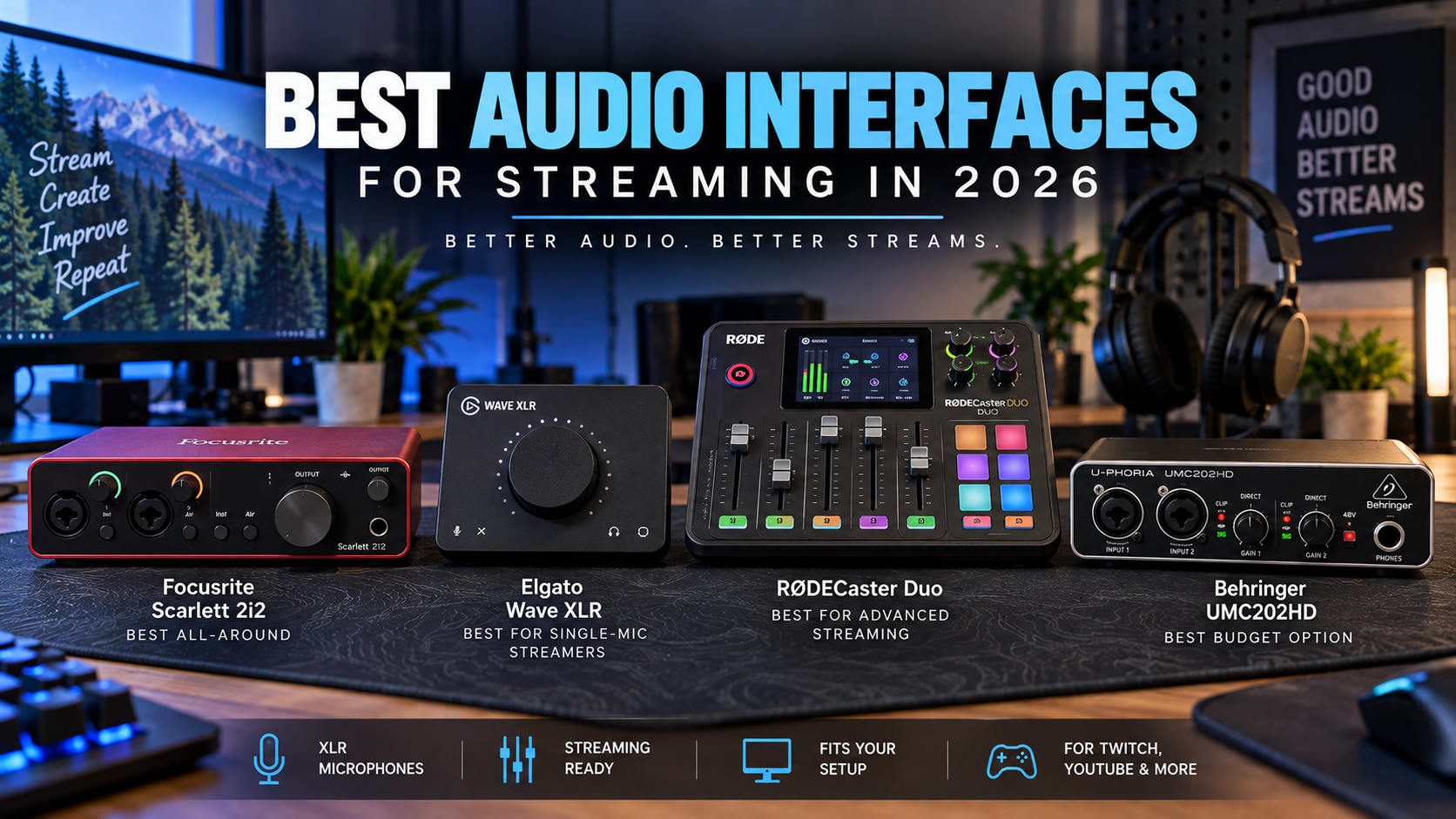
Transitioning from a basic USB microphone to a professional XLR setup requires a dedicated hardware bridge: an audio interface. While entry-level USB microphones plug straight into your computer, an XLR microphone needs preamplification, analog-to-digital conversion, and clean gain to shine on platforms like Twitch and YouTube.
However, not all studio interfaces are designed with live streaming workflows in mind. Some focus purely on multi-channel music tracking, while others integrate deeply with software submixing suites to manage your game audio, Discord chat, and browser alerts without driving you crazy.
This guide explores the best audio interfaces for streaming, examining real-world differences in preamps, software routing, input counts, and budget tiers to help you choose the ideal hardware for your exact setup.
Key Takeaways
- Audio interfaces translate analog XLR microphone signals into clean digital audio for your computer while providing crucial headphone monitoring.
- Stream-focused interfaces like the Elgato Wave XLR offer integrated virtual submixing software to separate your game, chat, and mic tracks.
- Multi-input workhorses like the Focusrite Scarlett 2i2 handle dual microphones or instrument inputs with high-end preamp gain and safety features.
- All-in-one broadcast stations like the RØDECaster Duo combine physical faders, onboard processing, and sound pads into a single standalone device.
- Budget models like the Behringer UMC202HD deliver reliable dual XLR connectivity for creators who do not need advanced software routing.
- Matching your interface to the correct microphone type—such as dynamic mics requiring high gain or condenser mics needing phantom power—prevents audio clipping and noise issues.
Quick Picks
- Elgato Wave XLR — Single-microphone streamers seeking software submixing
- Focusrite Scarlett 2i2 — Multi-input streams and dual-host setups
- Behringer UMC202HD — Budget-conscious creators starting with XLR gear
- RodeCaster Duo — Advanced creators wanting a standalone broadcast console
- GoXLR Mini alternatives — Streamers looking for hardware control alternatives
Quick Comparison of Top Streaming Audio Interfaces
| Interface | Best For | Inputs | Software / Routing | Price Tier |
|---|---|---|---|---|
| Elgato Wave XLR | Stream-Centric Single Mic | 1 XLR | Wave Link Virtual Submixing | Mid-Range |
| Focusrite Scarlett 2i2 | Multi-Input Workhorse | 2 XLR / Line | Focusrite Control / Auto Gain | Mid-Range |
| Behringer UMC202HD | Budget XLR Setup | 2 XLR / Line | Standard OS Drivers | Budget |
| RØDECaster Duo | All-in-One Broadcast Studio | 2 Combo / Wireless | Onboard Touch Routing & Pads | Premium |
Elgato Wave XLR
Relevant option
Integrates directly with Wave Link software for easy stream and chat mix separation.
Who it is best for
Single-microphone streamers seeking software submixing
Important features
- 75 dB ultra-low-noise gain
- Proprietary Clipguard digital distortion prevention
- Capacitive mute button
- Wave Link software integration
Pros
- Excellent gain for dynamic mics
- Powerful virtual submixing software
- Compact desktop footprint
Cons
- Single XLR input only
- Requires software installation for full features
Elgato Wave XLR
View current specifications, availability, and pricing from the retailer.
Best for
Relevant option
Price and availability on Amazon
Check Price on AmazonFocusrite Scarlett 2i2
Relevant option
Delivers high-quality preamps and Auto Gain functionality for dynamic or condenser XLR mics.
Who it is best for
Multi-input streams and dual-host setups
Important features
- Dual independent preamps
- Auto Gain and Clip Safe automation
- USB-C bus-powered connectivity
- Pristine 24-bit/192kHz conversion
Pros
- Industry-standard audio fidelity
- Great for instruments and dual mics
- Robust metal build
Cons
- Lacks dedicated broadcast sound pads
- Advanced routing relies on Focusrite control software
Focusrite Scarlett 2i2
View current specifications, availability, and pricing from the retailer.
Best for
Relevant option
Price and availability on Amazon
Check Price on AmazonBehringer UMC202HD
Relevant option
Provides a clean entry point for creators needing standard dual XLR inputs without software bloat.
Who it is best for
Budget-conscious creators starting with XLR gear
Important features
- MIDAS microphone preamps
- 24-bit/192kHz resolution
- Zero-latency direct monitoring
- Sturdy metal chassis
Pros
- Highly affordable price point
- Dual XLR/instrument combo inputs
- Reliable hardware monitoring
Cons
- No companion mixing software
- Basic feature set compared to premium units
Behringer UMC202HD
View current specifications, availability, and pricing from the retailer.
Best for
Relevant option
Price and availability on Amazon
Check Price on AmazonRodeCaster Duo
Relevant option
Combines dual XLR preamps, physical faders, smart pads, and internal audio routing in one unit.
Who it is best for
Advanced creators wanting a standalone broadcast console
Important features
- Revolution Preamps with massive clean gain
- Six programmable SMART pads
- Dual USB-C connections
- APHEX vocal processing suite
Pros
- All-in-one physical control surface
- Exceptional preamps and effects
- Dual-PC streaming capability
Cons
- Significant financial investment
- Steeper learning curve for beginners
RodeCaster Duo
View current specifications, availability, and pricing from the retailer.
Best for
Relevant option
Price and availability on Amazon
Check Price on AmazonGoXLR Mini alternatives
Relevant option
Serves as a transition baseline for creators seeking broadcast software workflows.
Who it is best for
Streamers looking for hardware control alternatives
Important features
- Multi-channel audio routing
- Physical fader support
- Customizable profile management
Pros
- Recreates popular broadcast workflows
- Physical volume control per channel
Cons
- Availability can vary
- Requires careful driver configuration
GoXLR Mini alternatives
View current specifications, availability, and pricing from the retailer.
Best for
Relevant option
Price and availability on Amazon
Check Price on AmazonWhy Upgrading to an Audio Interface Matters for Streamers
Many creators start their streaming journey using plug-and-play USB microphones. While modern USB mics offer impressive clarity, they bundle the microphone capsule, preamp, and analog-to-digital converter into a single sealed unit. If you want to upgrade your microphone capsule down the road, or if you encounter software conflicts with USB drivers, your options remain severely limited.
Moving to a modular setup separates your microphone from your interface. An XLR microphone connects via a balanced three-pin cable to a dedicated external interface. This hardware handles the heavy lifting of boosting your voice signal cleanly, supplying 48V phantom power to condenser microphones, and converting analog sound waves into pristine digital data for your broadcast software.
- Separates the microphone capsule from the processing hardware for easier future upgrades.
- Provides dedicated analog gain control and clean preamplification to eliminate background hiss.
- Delivers zero-latency direct hardware monitoring through dedicated headphone jacks.
Preamps, Gain, and Clean Headroom
The quality of an audio interface is largely defined by its preamps. A preamp boosts the quiet signal from your microphone up to line level. Popular broadcast dynamic microphones often require substantial clean gain—sometimes 60 dB or more—to sound full and present without introducing self-noise.
When evaluating an interface, verify its maximum gain range and noise floor. High-end units provide transparent amplification, meaning they raise your voice volume without injecting a constant electronic hiss into your stream.
- Dynamic microphones typically require higher preamp gain than condenser microphones.
- Clean preamps prevent the need for aggressive digital gain boosts that amplify room noise.
Audio Interface vs. Streaming Mixer: Choosing the Right Approach
A common point of confusion for new streamers is whether to buy a traditional audio interface or a streaming audio mixer. Traditional interfaces focus on pristine audio fidelity, multi-channel instrument tracking, and low-latency ASIO drivers for music production and recording.
Streaming mixers, on the other hand, are engineered specifically for live broadcasting. They often feature physical sliders, mute buttons, sound effects pads, and virtual routing software designed to split your PC audio into distinct channels—such as separating your game sound from your Spotify music so copyright-protected tracks do not trigger muted VODs.
- Traditional interfaces prioritize pure signal conversion and physical inputs over broadcast routing.
- Streaming mixers emphasize real-time control surfaces, submixing software, and physical sound pads.
When You Need Virtual Submixing
If you stream complex setups involving Discord calls, game audio, alert sounds, and background music, managing your volume levels can become chaotic. Software submixing suites allow you to route different Windows applications into separate virtual audio channels.
This ensures your audience hears a perfectly balanced mix, while you hear custom audio balances in your headphones without affecting the main stream output.
- Virtual submixing prevents game audio from drowning out your voice.
- Allows creators to isolate music tracks from Twitch VODs easily.
Elgato Wave XLR
The Elgato Wave XLR is built from the ground up for single-microphone content creators and live streamers. It bridges the gap between traditional XLR hardware and advanced software routing, making it one of the most streamlined options for Twitch and YouTube broadcasters.
Featuring a capacitive mute button, proprietary Clipguard technology to prevent sudden shouting distortion, and seamless integration with Wave Link software, it handles complex stream routing without requiring a bulky hardware mixer.
- Up to 75 dB of ultra-low-noise gain to drive gain-hungry dynamic microphones without external boosters.
- Proprietary Clipguard technology automatically reroutes audio peaks to prevent digital distortion.
- Deep integration with Wave Link software for advanced virtual submixing and channel separation.
Software Integration and Wave Link
Wave Link serves as a virtual digital mixing desk for your entire PC. It aggregates your microphone, game audio, chat applications, web browsers, and music into independent submixes.
You can send one balanced mix to your streaming software while monitoring a completely different balance in your headphones during intense gameplay.
- Creates multiple virtual audio outputs for OBS Studio or Discord.
- Supports VST audio effects plugins directly on your microphone input.
Focusrite Scarlett 2i2
The Focusrite Scarlett 2i2 is a legendary multi-input workhorse found in home recording studios and streaming setups worldwide. Its dual XLR/instrument inputs make it ideal for creators who host co-hosts in the same room, interview guests, or connect musical instruments alongside their vocal microphone.
Recent generations of the Scarlett series add intelligent automation tools like Auto Gain and Clip Safe, ensuring your voice remains at a broadcast-ready level even when you get excited during intense gaming moments.
- Dual independent inputs for multi-mic streaming or musical accompaniment.
- Auto Gain feature sets your ideal recording level automatically within seconds.
- Clip Safe mode monitors your volume in real time and adjusts gain dynamically to prevent clipping.
Hardware Build and Direct Monitoring
The Scarlett 2i2 features rugged metal construction and high-performance analog-to-digital converters derived from professional studio gear. Its direct monitoring switch lets you hear your voice instantly with zero processing delay.
For creators transitioning from music production to live streaming, the Scarlett provides a familiar, robust platform that works reliably across Windows and macOS.
- Zero-latency direct monitoring for real-time vocal feedback.
- Robust USB-C bus-powered connectivity for portability.
Behringer UMC202HD
For streamers operating on a strict budget who still want the superior clarity of an XLR microphone, the Behringer UMC202HD offers a straightforward, no-frills entry point. It provides two MIDAS-designed microphone preamps housed in a sturdy metal chassis.
While it lacks the advanced proprietary software suites or touchscreens found on premium broadcast gear, it delivers clean 24-bit/192kHz audio conversion and reliable direct monitoring without unnecessary financial overhead.
- Dual MIDAS microphone preamps with 48V phantom power support.
- Ultra-low latency analog direct monitoring for zero-delay headphone feedback.
- Sturdy metal impact-resistant chassis built for desktop durability.
Where the Budget UMC202HD Fits
The UMC202HD is best suited for beginner streamers who want to pair an affordable XLR microphone like the Audio-Technica AT2020 with a reliable hardware interface without paying extra for bundled software.
Because it relies on standard operating system audio drivers rather than proprietary software mixers, you will handle audio routing within OBS Studio using native filters.
- Ideal for budget-conscious creators starting with basic dual XLR needs.
- Relies on standard OBS routing rather than companion control software.
RØDECaster Duo
The RØDECaster Duo is an all-in-one compact broadcast studio designed for advanced content creators, podcasters, and professional live streamers. It combines dual high-gain preamps, customizable SMART pads, physical volume faders, and powerful internal audio processing into a single tabletop console.
With dual USB-C interfaces, it allows two computers to connect simultaneously—making dual-PC streaming setups or collaboration streams remarkably easy to manage.
- Revolutionary high-gain, low-noise Revolution Preamps capable of driving any dynamic microphone effortlessly.
- Six programmable SMART pads for triggering sound effects, voice changers, and MIDI commands.
- Dual USB-C audio interfaces supporting multi-computer streaming workflows.
Onboard Processing and Routing Flexibility
The RØDECaster Duo features studio-grade APHEX audio processing, including compression, EQ, de-essing, and the iconic Big Bottom and Aural Exciter effects.
Its touchscreen interface and tactile rotary encoders give you instant physical control over every audio source on your stream without needing to alt-tab out of your game.
- Broadcast-quality vocal processing built directly into the hardware.
- Intuitive touchscreen interface for custom channel routing.
How to Choose Based on Microphone, Workflow, and Inputs
Selecting the right audio interface ultimately depends on three core factors: your microphone type, your input requirements, and your preferred workflow style. Dynamic microphones like the Shure MV7X or RODE PodMic require clean, high-gain preamps, making units like the Elgato Wave XLR or RØDECaster Duo exceptionally well-suited.
Conversely, if you need to connect musical instruments or host multiple people in your studio, a multi-input workhorse like the Focusrite Scarlett 2i2 provides the physical connections you need. Always verify whether your setup requires virtual submixing software or if standard operating system routing is sufficient for your stream.
- Match gain requirements to your microphone choice to avoid background hiss.
- Assess whether you need single-mic simplicity, dual inputs, or multi-channel mixing.
Experience Level and Upgrade Paths
Beginner streamers benefit from interfaces with straightforward controls and automated gain settings, such as the Scarlett 2i2 or Wave XLR. These reduce the learning curve and let you focus on content creation.
Advanced creators managing multi-PC streams, dual microphones, and complex soundboard cues will find the investment in an all-in-one station like the RØDECaster Duo well worth the cost.
- Beginners should prioritize ease of setup and reliable gain handling.
- Advanced streamers should evaluate physical controls and dual-computer routing.
Frequently Asked Questions
faqQ: Do I need an audio interface if I use a USB microphone?
No. USB microphones have built-in analog-to-digital converters and preamps that plug directly into your computer's USB port. Audio interfaces are specifically required for XLR microphones.
faqQ: What is 48V phantom power, and do I need it?
Phantom power is an electrical voltage sent through an XLR cable to power condenser microphones and active inline preamps. Dynamic microphones like the Shure SM7B or RODE PodMic do not require phantom power.
faqQ: Can I use an audio interface with a dual-PC streaming setup?
Yes. Interfaces with multiple USB connections or auxiliary line outputs—such as the RØDECaster Duo—make routing audio between a gaming PC and a streaming PC much simpler.
faqQ: How do I prevent my game audio from echoing on stream?
Echoes usually occur when your streaming software captures both your hardware monitor and your desktop audio simultaneously. Using virtual routing software like Elgato Wave Link helps isolate each audio source into distinct channels.
faqQ: Why is my XLR microphone too quiet on my interface?
Some dynamic microphones require substantial gain. If your interface's preamps max out without reaching adequate volume, you may need a higher-gain interface or an active inline preamp booster.
faqQ: Can I connect musical instruments to a streaming audio interface?
Yes. Most multi-input interfaces like the Focusrite Scarlett 2i2 feature combo jacks that accept both XLR cables for microphones and 1/4-inch instrument cables for guitars and keyboards.
faqQ: What is direct monitoring on an audio interface?
Direct monitoring routes your microphone signal directly to your headphones before it reaches your computer's operating system, eliminating any perceptible audio delay.
Conclusion
Choosing the right audio interface transforms your streaming audio from basic to broadcast-ready. Whether you opt for the stream-focused Elgato Wave XLR, the versatile Focusrite Scarlett 2i2, the budget-friendly Behringer UMC202HD, or the powerhouse RØDECaster Duo, matching your gear to your microphone and workflow ensures crystal-clear voice clarity for your audience.
Evaluate your input needs, software preferences, and budget tier before making your decision, and always verify current specifications in official product documentation to build a reliable streaming setup that lasts.
Related gear
Audio-Technica AT2020
Relevant option
Pairs seamlessly with standard XLR interfaces for detailed vocal capture.
Who it is best for
Studio-quality vocal capture in controlled rooms
Important features
- Cardioid condenser capsule
- Custom-engineered low-mass diaphragm
- Wide frequency response
Pros
- Exceptional detail and clarity
- Affordable entry into studio condensers
Cons
- Requires 48V phantom power from an interface
- Picks up background room noise easily
Audio-Technica AT2020
View current specifications, availability, and pricing from the retailer.
Best for
Relevant option
Price and availability on Amazon
Check Price on AmazonAudio-Technica ATH-M50x
Relevant option
Offers neutral, closed-back headphone monitoring directly connected to interface outputs.
Who it is best for
Accurate audio monitoring during live streams
Important features
- Pro-grade sound tuning
- Closed-back circumaural design
- Collapsible earcups
Pros
- Excellent sound isolation
- Durable, comfortable build
Cons
- May feel tight on larger heads during long sessions
Audio-Technica ATH-M50x
View current specifications, availability, and pricing from the retailer.
Best for
Relevant option
Price and availability on Amazon
Check Price on AmazonAudio-Technica ATR2500x-USB
Relevant option
Provides a benchmark comparison for streamers weighing USB convenience against XLR interfaces.
Who it is best for
Simple plug-and-play USB setups
Important features
- Side-address condenser microphone
- USB-C output connection
- Headphone jack with volume control
Pros
- No separate interface required
- Straightforward USB setup
Cons
- Limited upgrade flexibility
- Bound to built-in USB conversion
Audio-Technica ATR2500x-USB
View current specifications, availability, and pricing from the retailer.
Best for
Relevant option
Price and availability on Amazon
Check Price on Amazon